Apple Stopped Selling an 8GB MacBook Pro

The 14-inch MacBook Pro moved its base configuration from 8GB to 16GB of unified memory when the M4 chip replaced the M3 in October 2024, and the M5 generation, introduced October 15, 2025, kept 16GB as the starting point. Apple’s current tech specs list the entry 14-inch M5 MacBook Pro at $1,599 with 16GB of unified memory and 512GB of storage.
That matters because most people typing this question today are not standing in front of a checkout screen deciding between two configurations. They are looking at a secondhand or refurbished machine, or they already own one, and want to know if it still holds up. The MacBook Pro line simply does not offer a new path into 8GB anymore, so the honest version of this question is whether a used 8GB MacBook Pro is still worth buying or keeping, not whether to pick 8GB or 16GB at checkout.
Can I upgrade the RAM on a used MacBook Pro myself?No. Every MacBook Pro since the 2020 13-inch M1 model uses unified memory built into the main chip package, so the memory configuration is fixed for the life of the machine. There is no slot to open or module to swap.
Which MacBook Pro Generations Shipped With 8GB
| Model and year | Chip | Base memory at launch | Status today |
|---|---|---|---|
| 13″ MacBook Pro (2019 to 2020) | Intel Core i5 | 8GB | Discontinued, resale only |
| 13″ MacBook Pro (2020) | M1 | 8GB | Discontinued, resale only |
| 13″ MacBook Pro (2022) | M2 | 8GB | Discontinued, resale only |
| 14″ MacBook Pro (Nov 2023) | M3 | 8GB | Discontinued, resale only |
| 14″ MacBook Pro (Oct 2024) | M4 | 16GB | Discontinued, resale only |
| 14″ MacBook Pro (Oct 2025 to present) | M5 | 16GB | Currently sold new |
Sources: Apple’s M1 13-inch tech specs, M2 13-inch tech specs, M3 14-inch tech specs, and the MacBook Pro (Apple silicon) history on Wikipedia, which documents the M4 generation’s move to a 16GB baseline.
The jump from 8GB to 16GB base memory happened between the M3 and M4 generations, in October 2024.
What 8GB Handles Without Trouble

On an M1, M2, or M3 MacBook Pro, 8GB comfortably runs a browser with a dozen or so tabs, Mail, Calendar, Pages or Word, Spotify, and a video call at the same time, because macOS compresses inactive memory before it resorts to disk.
- Everyday office and communication work: email, calendar, word processing, spreadsheets with a few thousand rows, and video calls one at a time.
- Casual browsing: roughly 10 to 15 tabs across Safari or Chrome, especially with an ad blocker, since ad-heavy pages are disproportionately memory-hungry.
- Basic Apple Intelligence features: Apple lists 8GB of unified memory as the minimum for features such as Writing Tools and notification summaries on any M-series chip.
- Light photo editing: single-image adjustments in Photos or a lightweight editor, as opposed to large batch exports.
Does 8GB unified memory really work like more RAM on a Windows PC?Partly. Apple’s marketing has compared 8GB unified memory to more RAM on a traditional PC, and macOS’s memory compression together with a shared CPU and GPU pool does make 8GB stretch further than 8GB of separate, uncompressed RAM would on Windows. It is not a like-for-like doubling: a workload that needs a dedicated memory allocation, such as a Windows virtual machine or a large photo catalog, still hits the same 8GB ceiling no matter how efficiently macOS manages it.
Where 8GB Runs Out of Room
8GB becomes a limitation once a task needs more memory reserved for itself than the system has to give, which is exactly what happens with several common professional workloads.
| Task or app | What it needs | Fits in 8GB? |
|---|---|---|
| 10 to 15 browser tabs, Mail, music streaming | Light; macOS compresses aggressively | Yes, comfortably |
| Photoshop, documents under 500MB | 16GB minimum recommended for reliable performance | Workable but tight; expect scratch-disk activity |
| Basic Apple Intelligence (Writing Tools, summaries) | 8GB minimum, any M-series chip | Yes, meets the published minimum |
| Apple’s most capable on-device AI model (iOS 27 / macOS 27) | 12GB minimum, M3 or later | No, unavailable below 12GB |
| Windows virtual machine or Docker containers | A dedicated multi-gigabyte allocation on top of macOS itself | No, causes sustained swap |
Sources: Puget Systems’ Photoshop hardware guidance and MacRumors on the new 12GB threshold for Apple’s most capable on-device model.
Two thresholds decide most of this table: Photoshop’s own lab-tested minimum sits at 16GB for anything but the smallest files, and every AI or virtualization row above needs 12GB or a dedicated allocation that 8GB cannot supply.
Will an 8GB MacBook Pro run Apple Intelligence?The basic features, including Writing Tools and notification summaries, need a minimum of 8GB of unified memory and an M-series chip, so they run. Apple’s most capable on-device model, introduced for iOS 27 and the matching macOS release, needs at least 12GB, which puts it out of reach for every 8GB MacBook Pro regardless of chip generation.
Does Swapping to the SSD Wear Out a MacBook Pro?
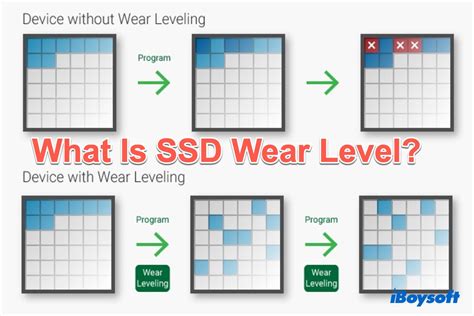
Modern Mac SSDs are rated for roughly 3,000 erase-write cycles per memory cell, and independent tracking of real machines has found that reaching that limit through ordinary use takes on the order of decades, not years.
How do I check how much my Mac is swapping?Open Activity Monitor, click the Memory tab, and look at the Memory Pressure indicator at the bottom of the window. Green means there is headroom, yellow means the system is leaning on compression and some swap, and red means swap is heavy enough to slow the machine down.
Buying or Keeping a Used 8GB MacBook Pro

| What to check | Why it matters | Action |
|---|---|---|
| Chip generation | Apple Silicon manages 8GB far more efficiently than Intel-era 8GB | Skip Intel 13-inch models with 8GB entirely |
| Battery cycle count | A high count on an aging unit often correlates with heavy sustained use, the same pattern that stresses 8GB | Check via the Apple menu, About This Mac, System Report |
| Paired storage size | 8GB units were commonly sold with 128GB or 256GB storage, tightening scratch-disk headroom | Prefer 256GB or more for any creative work |
| Intended primary app | Xcode’s newer completion tools and Apple’s most capable AI model need 12GB | Confirm your main app’s minimum before buying |
| Price gap versus a 16GB unit of the same generation | Determines whether the savings justify the workload ceiling | Compare current listings rather than assuming a fixed discount |
None of these checks are disqualifying by themselves; stacking two or more of them, an Intel chip with a 128GB drive and a workload that needs Xcode or a virtual machine, turns an 8GB unit into a false economy.
Is a used 8GB MacBook Pro a better deal than a new 16GB one?It depends on the price gap and the workload. If a used 8GB M2 or M3 MacBook Pro costs meaningfully less than a new 16GB M5 model and the work stays inside browsing, office apps, and light photo editing, the savings hold up. If Xcode, a Windows virtual machine, or Photoshop on large files is coming eventually, the 16GB or higher machine avoids a ceiling that shows up within months.
When to Pay More Instead
If daily work already leans on Adobe Creative Cloud apps, Xcode, Docker, or any virtual machine, the extra $200 to $400 for 16GB or 24GB is worth spending instead of gambling on 8GB, used or new. Puget Systems’ lab testing recommends starting at 16GB even for Photoshop documents under 500MB, and that threshold climbs quickly with layered files.