The cheapest way onto YouTube TV right now
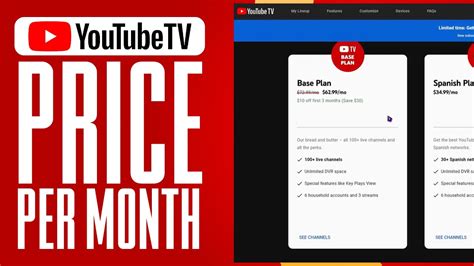
YouTube TV’s list price is $82.99 a month for the Base Plan, and that’s what most new subscribers actually pay unless they check the pricing page first.
As of this writing, new subscribers pay $67.99 a month for the first three months of the Base Plan, a $45 total discount, before the price reverts to $82.99; the offer is scheduled to end August 26, 2026. The Sports Plan carries a steeper long-term discount for new users: $54.99 a month for a full 12 months, versus $64.99 for existing subscribers, a $120 first-year saving that only new accounts qualify for.

Internet providers add a second discount layer outside YouTube TV’s own site. Verizon and Frontier bundle offers currently knock $10 to $20 a month off the Base Plan for six to twelve months, for customers who’ve never held a YouTube TV account.
These offers share one restriction that matters more than their size: every one is written for accounts that have never held a YouTube TV subscription or free trial before. A returning subscriber, or someone reactivating a paused account, doesn’t qualify for any of them.
Genre plans: what you give up for what you save
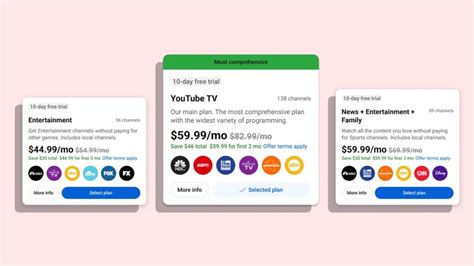
Since February 2026, YouTube TV has sold genre-specific plans priced below the $82.99 Base Plan, each carrying every core platform feature, unlimited DVR, up to 6 accounts, multiview, with a smaller channel list.
| Plan | Existing-subscriber price | New-subscriber price | Core channels | Best for |
|---|---|---|---|---|
| Sports | $64.99/mo | $54.99/mo, first 12 months | ESPN networks, FS1, NBC Sports Network, plus local | Households that watch sports and little else |
| Sports + News | $71.99/mo | $56.99/mo, first 3 months | Sports lineup plus CNBC, Fox News, MSNBC, CNN, C-SPAN, Bloomberg, Fox Business | Sports fans who also want cable news |
| Entertainment | $54.99/mo | $44.99/mo, first 3 months | FX, Comedy Central, Bravo, Paramount Network, Food Network, HGTV, plus local | Non-sports households |
| News + Entertainment + Family | $69.99/mo | $59.99/mo, first 3 months | Entertainment and news lineup plus Disney Channel, Nickelodeon, National Geographic | Families that don’t need sports |
Every genre plan undercuts the Base Plan by at least $18 a month even at the existing-subscriber rate, and the discount widens for new accounts. A household that doesn’t watch one of the three excluded genres, sports, news, or family programming, has no financial reason to stay on the $82.99 plan.
What plan switching does to your library
Switching between YouTube TV plans takes effect immediately, and any DVR recording tied to a channel your new plan doesn’t include is removed from your library. If you switch back to a plan that includes that channel within 21 days, the recording returns automatically; after that window, it’s gone for good.
Getting a second household member the new-subscriber price
YouTube TV’s welcome pricing is tied to the Google account signing up, not to the household or the payment method. If you’ve already used your account’s eligibility, whoever else in your home hasn’t held a YouTube TV subscription or trial can start their own account at the new-subscriber rate and add the rest of the household to their family group afterward. Family groups support up to 5 additional members who share the plan’s channels and each get a separate profile and DVR library.
A few conditions apply, drawn directly from YouTube TV’s own offer terms:
- Never subscribed or trialed: the signing-up Google account can’t have held a YouTube TV subscription or free trial before.
- Own account, own payment method: the new subscriber needs their own Google account and a valid payment method.
- One offer per person: each welcome offer is limited to one redemption per eligible account, and Google can change or cancel any offer at any time.
Pause or cancel: the difference that actually matters

Pausing and canceling produce very different outcomes for a library full of recordings.
| Action | Billing while inactive | DVR recordings | How to reverse |
|---|---|---|---|
| Pause, 4 weeks to 6 months | No charge | Kept, still subject to the standard 9-month expiration | Resume any time before the scheduled end date |
| Cancel | No charge; access continues through the current billing period | Deleted after 21 days | Resubscribe at the current price; preferences are saved |
| Switch to a cheaper plan | Billed at the new plan’s rate immediately | Recordings tied to dropped channels removed unless reversed within 21 days | Switch again at any time |
A subscriber taking a two-month break for the off-season loses nothing by pausing. The same two-month break spent cancelled costs every recording made more than three weeks earlier.
Does pausing my YouTube TV membership delete my recordings?No. Paused recordings stay in your library under the same 9-month expiration as an active account. Only a full cancellation triggers the faster 21-day removal.
The broadcast delay setting, and when to leave it alone
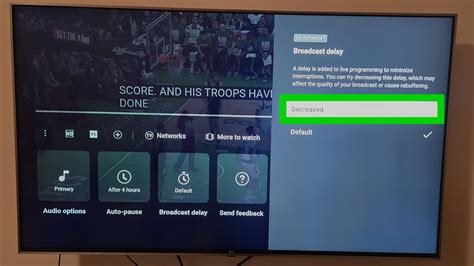
Under the three-dot menu during live playback, YouTube TV offers a Broadcast Delay setting with two options, Default and Decrease. Decrease trims the buffer YouTube TV keeps between the live broadcast and what reaches your screen, at the cost of a higher chance of playback interruptions if your connection dips. Google’s own guidance sets a 3 Mbps minimum for acceptable playback, with more headroom recommended for the Decrease setting to hold up during high-demand moments like a playoff game.
Is the Broadcast Delay setting available on the phone app?No. It’s only available on smart TVs and TV-connected streaming devices, not in the mobile app or a web browser.
Family sharing’s home check-in rule
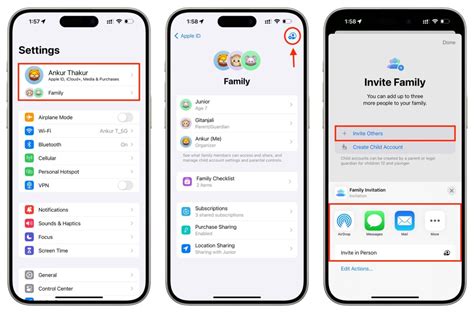
A YouTube TV family group covers up to 5 additional members at no extra cost, but every member is expected to primarily live in the family manager’s household, and Google requires members to periodically use YouTube TV from that home location to keep access. Google’s own wording stays deliberately non-specific about the exact interval, but subscribers who travel for extended periods commonly report losing access to live TV until they re-verify at home.
How often do I need to check in at home to keep family sharing active?Google’s policy says “periodically,” without a published number of days. Travelers who’ve gone several months without returning home commonly report a location-verification prompt, so treat an occasional visit home as a requirement, not a suggestion.
What’s unverified before you try a hack you read online
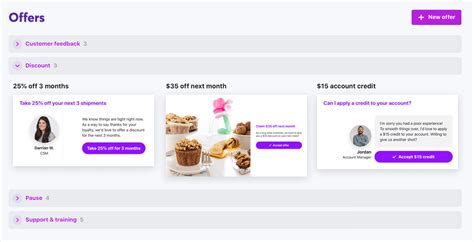
Streaming services across the industry, Disney’s bundle plans among them, are documented offering a discount when a subscriber starts the cancellation process, sometimes called a retention offer. Whether YouTube TV runs an equivalent offer isn’t confirmed anywhere in YouTube TV’s own documentation, and the specific dollar figures circulating for it come from individual subscribers’ one-time experiences, not from Google.