Which Glitch Are You Actually Seeing?
TikTok’s glitches split into ones that follow you around the app, tied to cache, connection, or app version, and ones that hit everyone on the platform at once, which point to TikTok’s servers instead of your device.
| Symptom | Most likely cause | First thing to try |
|---|---|---|
| Feed frozen or won’t refresh | Local cache buildup or a dropped connection | Clear TikTok’s in-app cache, then check your connection |
| Videos stutter, buffer, or won’t load | Weak connection or an outdated app build | Test your connection; update the app if it’s a version or two behind |
| Comments won’t post or vanish after posting | Server-side hiccup, occasionally an automated hold | Retry after a few minutes; if it’s happening platform-wide, it’s an outage |
| Stuck at 0 views on a fresh post | Usually server-side processing delay; occasionally a guideline-based limit | Check whether other creators report the same thing before assuming a personal penalty |
| Camera stutters or lags only while recording | Thermal throttling, low storage, or a busy background process | Close other apps, let the phone cool, confirm free storage |
| Video looks washed out right after recording | An HDR or color-profile mismatch with TikTok’s encoder | Turn off HDR capture, or apply a filter after import |
| An edit disappears or a video corrupts after posting | An interrupted upload, often after a long in-app editing session | Reopen Drafts first; don’t force-quit mid-upload |
| Can’t favorite or save videos | Temporary feature-level restriction or a version mismatch | Update the app; otherwise it’s usually a short-lived platform limit |
Five of these eight symptoms trace to your phone’s cache, storage, or connection; checking your own device first saves more time than assuming an outage by default.
Step 1: Check Whether TikTok Itself Is Down
TikTok doesn’t run a dedicated public status page, so the fastest outside check is Downdetector’s live report volume, cross-referenced with TikTok’s own posts on X, which is where the company confirmed both of its 2026 outages within hours of each one starting.
On March 3, 2026, reports about TikTok on Downdetector climbed from roughly 700 by midday to more than 1,400 by early evening, and TikTok’s USDS joint venture confirmed on X that the cause was an issue at an Oracle data center, its second Oracle-linked disruption in about six weeks. The first, on January 25 and 26, produced more than 585,000 cumulative Downdetector reports and was traced to a power outage at a U.S. data center partner site.
| Date | Reported trigger | Reported scale | What TikTok said |
|---|---|---|---|
| Jan 25 to 26, 2026 | Power outage at a US data center partner | 585,000+ cumulative Downdetector reports | Acknowledged bugs, slow loads, timed-out uploads, and the 0-views issue as server-side |
| Mar 3, 2026 | Oracle data center issue | Reports grew from about 700 to 1,400+ in one day | Said creators might see posting lags while Oracle resolved it |
| Any 90-day window in 2026 (baseline) | Unspecified, routine | 1 tracked incident, median duration 50 minutes | No major public statement needed |
The two named 2026 incidents each ran far longer and wider than TikTok’s typical tracked outage, so a report count in the hundreds of thousands, rather than a handful of complaints, is what separates a real platform-wide event from an isolated bad connection. A Gartner cloud infrastructure analyst told American Bazaar that two outages within weeks of each other point to capacity or configuration issues with the new infrastructure, not simple bad luck.
How do I know if it’s TikTok or just my phone?Check Downdetector’s report volume for TikTok and try the app on mobile data instead of Wi-Fi, or vice versa. If the problem follows you across networks and matches a spike in outside reports, it’s platform-wide.
Why does TikTok say I have 0 views all of a sudden?Most single-post stalls clear within an hour and trace to server-side processing; a genuine guideline-based limit usually comes with an in-app notice instead of silence.
Step 2: Fix It on Your Device
Clear TikTok’s Own Cache First
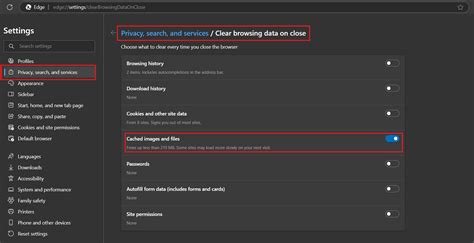
Open Profile, tap the menu icon, go to Settings and privacy, then Free up space, and tap Clear next to Cache. This removes temporary files TikTok stores locally and is safe: it does not touch your login, your posts, or your drafts.
When Cache-Clearing Isn’t Enough
If clearing the in-app cache doesn’t help, the next step depends on your platform, and the two options are not interchangeable.
| Platform | Action | What it actually does |
|---|---|---|
| iOS | Requires iOS 14.0 or later to install the current build | Older iPhones can’t run the latest TikTok at all, which shows up as persistent glitching, not a clean install failure |
| iOS | Offload App or Delete App (Settings, General, iPhone Storage) | Removes locally stored data and cache; iOS has no separate in-app-only cache control at the system level |
| Android | Clear cache (Settings, Apps, TikTok, Storage) | Removes temporary files only; safe and reversible, and doesn’t log you out or touch drafts |
| Android | Clear data or Clear storage (same menu) | Resets the app to its just-installed state: you’re logged out, and anything stored only locally, including drafts, can be lost |
Does clearing TikTok’s cache delete my drafts?No. TikTok’s in-app cache clear only removes temporary files. Drafts live in the app’s private data, which only a full data reset, an offload, or a reinstall can wipe.
Is Your Phone Too Old for the Current Build?
Apple’s own App Store listing sets the current floor at iOS 14.0 or later; anything older can’t install the latest TikTok build at all, and an app several versions behind is where a lot of unexplained glitching quietly comes from. Google Play’s listing for TikTok doesn’t publish an equivalent minimum Android version, so there’s no single number to check there. If the Play Store won’t offer you an update at all, an outdated Android version is the likely reason, and no amount of cache-clearing fixes that.
If You’re Glitching While Filming or Editing
Camera stutter, washed-out color, and vanishing edits are almost always local problems tied to heat, storage, or an interrupted save; they have different causes than feed or playback glitches.
Camera Stutter or Washed-Out Color
Recording pushes the camera sensor, the video encoder, and local storage at the same time, so thermal throttling or a nearly full drive shows up during capture even when everything else on the phone runs fine. A washed-out or over-saturated clip right after recording usually points to an HDR or color-profile mismatch between your camera and TikTok’s encoder: turning off HDR capture before filming, or applying a manual filter after import, corrects it in most cases.
Edits Disappearing or Uploads Corrupting
- Keep editing sessions under 30 to 45 minutes before saving to Drafts; long, uninterrupted sessions are where corruption after posting shows up most often.
- Reopen Drafts first if you suspect a corrupted upload, before doing anything else in the app.
- Don’t force-quit mid-upload. An interrupted upload is the most common cause of an edit that “disappears” right after you post it.
Why does my camera glitch only while I’m filming, not while I’m scrolling?Recording taxes the camera sensor, encoder, and storage simultaneously, so thermal throttling or a nearly full drive shows up during capture even when playback elsewhere looks fine.
Less Obvious Things Worth Checking
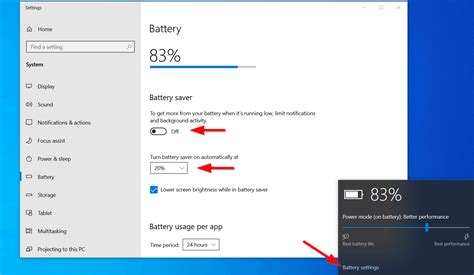
- Battery Saver or Low Power Mode. Both throttle background processing and can make TikTok stutter or drop frames during recording, even with a full cache clear.
- Background App Refresh or a data saver setting. These can delay TikTok’s feed and notifications from updating, which looks identical to a glitch from the outside.
If You’re in a Restricted Country
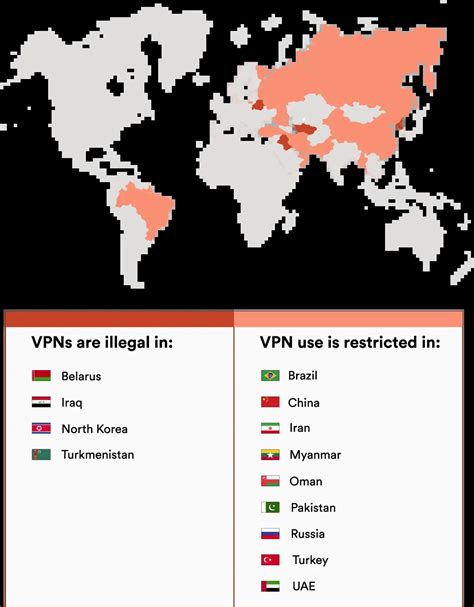
A VPN only helps with government-level blocks; it does nothing for cache, connection, or server problems, and treating it as a default fix wastes time on the wrong diagnosis. India has blocked TikTok nationwide since June 2020, and the block remains in force; several other countries’ restrictions change often enough that a current news search for your specific country is more reliable than any fixed list.
Could TikTok get pulled from app stores again like in January 2025?It happened once already: TikTok briefly left the US App Store and Google Play in January 2025 under a federal divestiture law, then returned to both stores in February 2025 after assurances from the administration. The underlying law hasn’t been repealed, so a repeat delisting remains possible, though the app itself kept working for anyone who already had it installed the first time.
When to Just Wait, and When It’s Something Else
If Downdetector reports are spiking and TikTok’s own account has already acknowledged the issue, there’s nothing to fix on your end beyond waiting, typically under an hour based on TikTok’s tracked 90-day baseline, though the two major 2026 incidents each ran considerably longer than that median.