Which iPad can actually do this
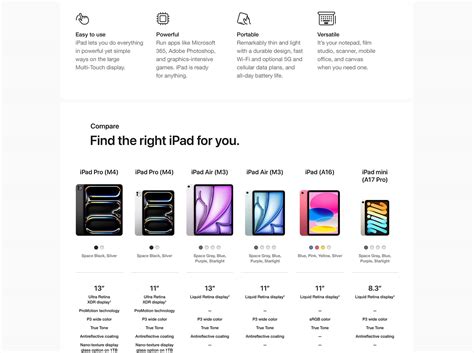
iPadOS 26 will install on anything with an A12 chip or later, which is a low bar. The features that make an iPad feel like a laptop sit well above that floor, and Apple gates them by chip rather than by price tier.
| iPad tier | Chip | Windowing + Stage Manager | External display extend | Apple Intelligence |
|---|---|---|---|---|
| Base iPad (11th gen) | A16 | Yes | No, mirror only | No |
| iPad mini (A17 Pro) | A17 Pro | Yes | No, mirror only | Yes |
| iPad Air (M2 or later) | M-series | Yes | Yes | Yes |
| iPad Pro (M4 or later) | M-series | Yes, up to 6K at 60Hz | Yes | Yes |
The seventh-generation iPad, with its A10 chip, cannot install iPadOS 26 at all and is excluded from this table entirely. Every other current model runs the new windowing system identically; what actually separates a real laptop-style setup from a bigger tablet is the M-series gate on external-display extension, not the windowing feature itself.
- Writers, students, and light knowledge work on an M-series Air or Pro with a trackpad keyboard: viable now.
- Photo and video editors doing lightweight cuts on a Pro with external storage: viable, though heavy color grading and plugin-dependent workflows still favor a laptop.
- Developers running local servers, containers, or a full CLI toolchain: not viable – iPadOS still does not run arbitrary background services.
- CAD, engineering, and Windows-only accounting software: not viable on any current iPad, regardless of chip.
Can a base iPad, one without an M-series chip, replace a laptop?For browsing, email, and document editing, yes. It cannot extend to an external monitor or run Apple Intelligence features, and heavier multitasking will feel more constrained than on an M-series model.
The setup that actually matters
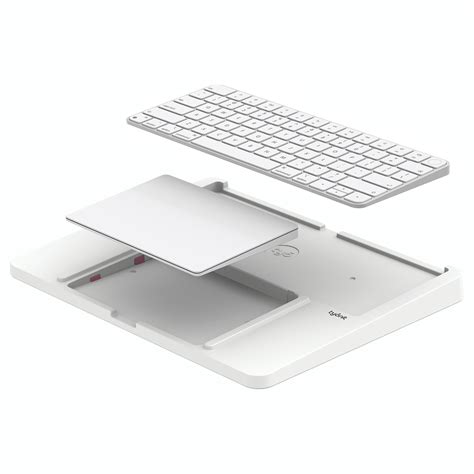
A trackpad keyboard is the one accessory every configuration needs; Apple’s own Magic Keyboard line is model-locked, so a Pro-specific keyboard will not attach to an Air, and vice versa. Beyond that, the setup differs mainly by storage and chip tier.
Storage and total cost
iPad storage cannot be upgraded after purchase, and Apple’s own upgrade pricing shows why that decision matters upfront: moving from 256GB to 512GB on the current iPad Pro adds $200, and 512GB to 1TB adds $400. A 1TB SanDisk Extreme portable SSD currently lists for $224.99 at Target, cheaper than Apple’s in-house 512GB-to-1TB jump and a workable substitute for anyone who can live with an external drive instead of paying Apple’s premium.
| Setup tier | iPad + storage | Keyboard | Total | Comparable MacBook Air (M4) |
|---|---|---|---|---|
| Air, 128GB | $599 | $269 | $868 | $999 (13″, 256GB) |
| Pro, 256GB | $999 | $299 | $1,298 | $999 (13″, 256GB) |
| Pro, 512GB | $1,199 | $299 | $1,498 | $1,199 (13″, 512GB) |
At every tier, the iPad setup costs about the same as or more than the directly comparable MacBook Air once a keyboard is added. The entry Air tier is the only one that lands meaningfully under its laptop counterpart.
File management: what changes
There is no visible drive directory the way Windows Explorer or macOS Finder shows one. The Files app organizes by app and by cloud service instead, which means a workflow built around nested folders needs rebuilding, not just relearning.
Will my files behave the same way they do on a laptop?Not identically. Cloud services and the Files app cover most everyday needs, but there is no traditional filesystem browser, and some apps only expose their own sandboxed storage.
What still won’t work

Some software categories have no path onto an iPad at all, regardless of accessories or chip tier. SOLIDWORKS is the clearest example: the vendor’s own system requirements state that SOLIDWORKS runs only on 64-bit Windows, with no macOS or iPadOS version offered. The same Windows-only pattern holds across most CAD, engineering-simulation, and legacy accounting software.
Is there specialized software that just will not run on an iPad?Yes. CAD and engineering-simulation tools are the most common case; SOLIDWORKS, for example, is Windows-only by the vendor’s own specification, with no macOS or iPadOS build in any tier.
Common setup mistakes
| Mistake | Consequence | Fix |
|---|---|---|
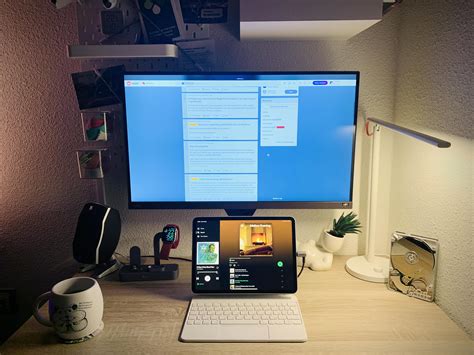
| Buying a keyboard case without a built-in trackpad | No cursor precision for editing or spreadsheets, still feels like a tablet | Choose a Magic Keyboard or Magic Keyboard Folio, both trackpad-equipped |
| Buying a non-M-series iPad expecting monitor extension | The external display only mirrors the iPad screen instead of adding workspace | Confirm the chip is M1 or later before buying a display cable or dock |
| Buying the wrong Magic Keyboard model | Apple’s keyboards are locked to specific iPad sizes and generations and simply will not attach | Match the keyboard’s listed compatible models to the exact iPad before ordering |
| Assuming storage can be added later | iPad storage is fixed at purchase; there is no internal upgrade path | Decide the storage tier upfront, or plan for an external SSD from day one |
Battery life: the real number and the marketed one
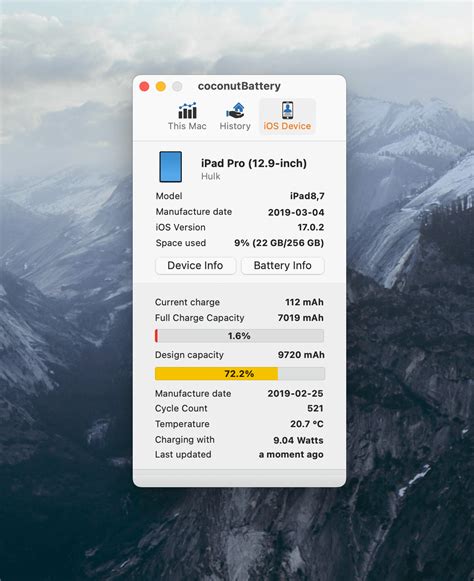
Apple’s tech-spec sheet for the current iPad Pro states up to 10 hours of surfing the web on Wi-Fi or watching video, tested at 50% brightness on a single task with no multitasking. Independent lab testing of the 11-inch iPad Pro found 9 hours 53 minutes on a web-browsing run and 15 hours 43 minutes on video playback, both close to or above Apple’s figure. The same test measured 8 hours 12 minutes under a gaming workload and a composite active-use score of 12 hours 37 minutes.
Does the iPad Pro really last 10 hours during real work?For a single task like browsing, independent testing confirms Apple’s figure almost exactly. Under multitasking with a keyboard and external display, expect closer to 8 hours.