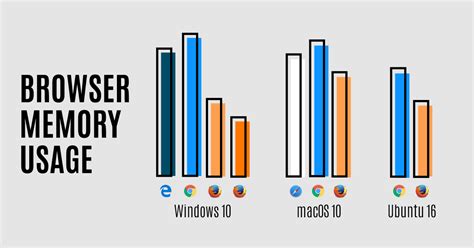
Most “lightest browser” lists are ranked opinion with a number attached. This page starts from one test that published its method, adds two manufacturer-confirmed memory features, and spends a section on why the same browser shows up at wildly different RAM figures across different guides.
Real Memory Benchmarks: Chrome vs. the Alternatives
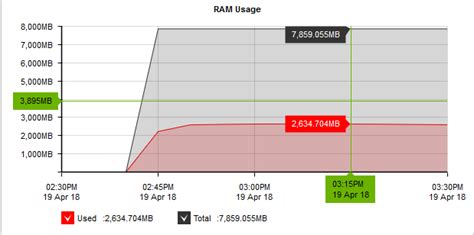
The clearest public test comes from MakeUseOf, which loaded the same 15 tabs, a mix of Asana, Notion, Google Docs, Gmail, YouTube, a news site, and a social feed, into each browser on a fresh restart with extensions disabled, then averaged three memory readings after a 30 to 45 second stabilization period.
| Browser | RAM, 15 tabs | Versus Chrome |
|---|---|---|
| Chrome | 5,737 MB | baseline |
| Opera | 6,141 MB | 7% higher |
| Zen (Firefox-based) | 5,424 MB | 5% lower |
| Firefox | 4,755 MB | 17% lower |
| Edge | 4,653 MB | 19% lower |
| Ungoogled Chromium | 4,318 MB | 25% lower |
| Brave | 3,329 MB | 42% lower |
| Thorium | 3,101 MB | 46% lower |
The split is not between Chromium and non-Chromium engines: Edge and Ungoogled Chromium are both Chromium, and they land on opposite sides of Firefox. The real divide is between browsers built to load fewer resources per page, Brave through ad and tracker blocking, Thorium through a stripped Chromium build, and browsers that add features on top of stock Chromium, which is where Opera’s result over Chrome comes from.
Is Brave’s ad blocking the main reason it uses less memory than Chrome?
Yes. Shields blocks ads, trackers, and third-party scripts before they load, so those files never consume memory in the first place, rather than being loaded and then discarded.
Why Two Guides Can List the Same Browser at 80 MB and at 300 MB

Why do lightweight-browser guides disagree so much on the same browser’s RAM usage?
Most published figures skip the details that change the result by hundreds of megabytes: how many tabs were open, which sites they were, whether extensions were installed, and whether the number is a single snapshot or an average. Without those details, two “tested” numbers for the same browser are not actually comparable.
Install Size Is Not Runtime Memory

A small download is often read as a promise of low memory while running, and that assumption breaks down on the browsers built with Electron. On Mac, SupaSidebar’s testing puts Min’s entire download at around 80 MB and DuckDuckGo for Mac under 50 MB, both far smaller than Chrome’s installed bundle of over 600 MB.
| Browser | Install size | Engine | Runtime behavior |
|---|---|---|---|
| Safari | 0 MB (ships with macOS) | WebKit | Lowest RAM in same-tab-set tests |
| DuckDuckGo for Mac | Under 50 MB | WebKit | Low per-tab RAM, WebKit-based |
| Orion | Around 100 MB | WebKit | Low RAM, still labeled beta |
| Min | Around 80 MB | Chromium (Electron) | Per-tab RAM closer to Chrome than to Safari |
| Chrome | Over 600 MB | Chromium | Highest per-tab RAM in this set |
Min’s download is the smallest browser install in this table by a wide margin, but because it runs on Chromium under Electron, its per-tab memory use tracks Chrome, not Safari. A tiny installer tells you about disk space, not about what happens once ten tabs are open.
Does a smaller download size mean a browser uses less RAM while running?
Not on its own. It depends on the rendering engine underneath. A small Electron or Chromium-based browser can still use Chrome-level RAM per tab; a small WebKit-based browser usually does not.
Built-In Memory Tools Before You Switch Browsers at All
Before installing anything new, three vendor-confirmed features already exist inside browsers most people have installed.
| Feature | Claimed or measured effect | Source |
|---|---|---|
| Chrome Memory Saver | Up to 40% and 10 GB less memory across a session | Google’s official Chrome blog, December 2022 |
| Brave Shields | 42% less RAM than Chrome in a 15-tab test | MakeUseOf benchmark above |
| Ungoogled Chromium | 25% less RAM than Chrome in the same test | MakeUseOf benchmark above |
| Chrome’s renderer (version 138) | 15 to 20% memory cut to the renderer process | Trade coverage citing Chrome’s 2026 release notes |
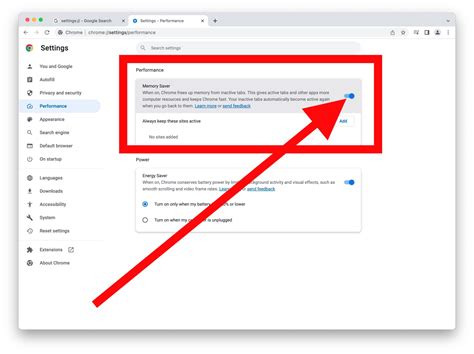
Chrome shipped its first Memory Saver mode on desktop in December 2022, promising up to 40 percent less memory by deactivating tabs you’re not using and reloading them automatically when clicked. By Chrome 140, released in September 2025, the feature moved from a fixed timer to a machine-learning model that predicts which tabs you’re likely to revisit and discards the rest sooner. Turning this on costs nothing and requires no new install, so it’s worth trying before assuming the browser itself is the problem.
Can I keep Chrome and just make it lighter instead of switching browsers?
Yes, to a point. Turning on Memory Saver at its Maximum setting gets close to Google’s published 40 percent figure, but it only affects inactive tabs; a browser with 20 heavy tabs actively open will still use more memory than a lighter browser with the same tabs open.
Matching the Browser to Your Actual Constraint
| Your situation | Pick | Why |
|---|---|---|
| Windows laptop, 4 GB RAM, need Chrome extensions | Brave or Ungoogled Chromium | Chromium-compatible, 25 to 42% lower measured RAM than Chrome |
| Squeezing every megabyte, comfortable with a small dev team behind the browser | Thorium | Lightest measured result (3,101 MB), but security updates can lag Chromium |
| Mac, want the lowest possible footprint | Safari, or Orion if you need extensions | WebKit engine keeps per-tab RAM lowest in same-tab-set tests |
| Old Windows 7 or Pentium-era machine, text-heavy browsing only | A minimal Gecko browser like K-Meleon | No sync, no telemetry, minimal background processes; exact RAM figure unverifiable, see the sourcing note above |
| Streaming from Netflix, Disney+, or Prime Video is a daily requirement | Any browser except Zen | Zen currently lacks a working DRM license for those services |
None of these picks require replacing your daily driver entirely. Most of the pros above who tested these setups kept a mainstream browser installed for the handful of sites that break on the lighter option.
Trade-offs the Rankings Leave Out

- Zen Browser and DRM: it currently faces issues streaming DRM-protected video from Netflix, Disney+, HBO Max, or Amazon Prime Video, which the developers say they are working to resolve.
- Thorium and update speed: it is maintained primarily by a single developer, who has stated that updates can lag behind Chromium, a real consideration for anyone using it for banking or other sensitive tasks.
- Ungoogled Chromium’s setup cost: there is no default search engine and no auto-update; extensions must be installed manually from CRX files, so the 25% RAM savings come with real manual maintenance.
- Legacy Gecko browsers and modern sites: K-Meleon and similarly minimal builds can fail to render sites that rely on current JavaScript frameworks or complex web apps, which is the trade for their small footprint.
Will switching to a lightweight browser fix a really old PC with 2 GB of RAM?
Partly. A lighter browser reduces one bottleneck, but a 2 GB machine is often also limited by an aging hard drive and an older CPU, so browsing will feel better, not fully modern.
When Saving 200 MB Isn’t the Right Goal
If a browser handles banking, passwords, or other sensitive accounts, the update cadence behind it matters more than a few hundred megabytes of RAM. A browser that’s 40 percent lighter but patches security issues weeks later than a mainstream one isn’t a good trade for that specific task, even if it wins every memory benchmark on this page.