Match your device to what’s free
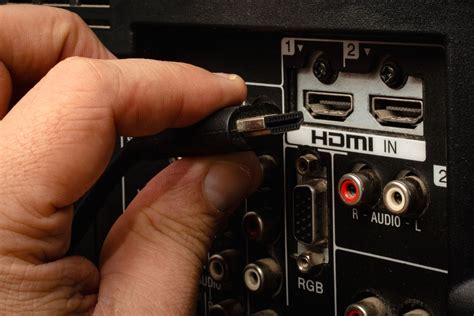
A soundbar or receiver only works on the port marked ARC or eARC, while a console or PC needs a port confirmed as genuinely 2.1-rated on the TV’s own spec sheet.
- Soundbar or AV receiver: the ARC or eARC labeled port only. No other port sends audio back out of the TV.
- PS5, Xbox Series X, or a gaming PC with a 2.1 output: a genuinely 2.1-rated port, confirmed against the TV’s own spec sheet by model number, since the box badge alone can cover a TV with only one or two such ports.
- PS4, Xbox One, or older consoles: any HDMI port works, no version requirement.
- 4K Blu-ray player or 4K streaming box: any HDMI 2.0 or 2.1 port supports 4K HDR at 60Hz.
- Laptop or older desktop PC: any port; a very old PC may need a DVI-labeled HDMI port plus a separate analog audio cable.
What the labels next to your ports mean
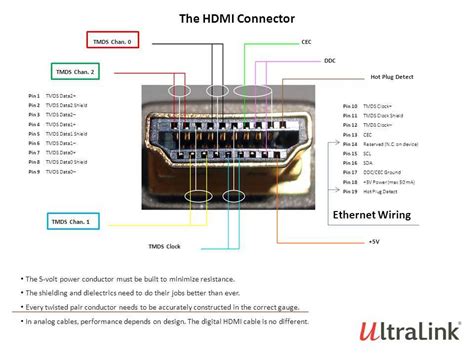
Six labels account for almost everything printed next to an HDMI port on a modern TV, and each one tells you exactly what to plug in.
| Label | What it means | What to plug in |
|---|---|---|
| ARC | Audio Return Channel, sends TV audio out at roughly 1 Mbps according to the HDMI Forum | A soundbar or receiver that does not support eARC |
| eARC | Enhanced ARC, up to about 37 Mbps, carries lossless Dolby Atmos, DTS:X, and Dolby TrueHD | A soundbar or receiver with eARC support, using a certified Ultra High Speed cable |
| Gamepad icon or “Game” | A VRR-capable HDMI 2.1 port, per Samsung’s own TV ports glossary | A gaming console or a gaming PC |
| DVI | Backward-compatible, video-only signal path | An older PC through a DVI-to-HDMI adapter, plus a separate audio cable |
| HDCP 2.2 | Current copy-protection needed for most 4K and UHD content | Any 4K source; ports without this label may refuse to display protected 4K content |
| “Good / Better / Best” or a bare number | A manufacturer’s own internal tier, not an HDMI version number | Whatever the manual says that tier actually supports |
Does it matter which port I use for a soundbar? Yes. Only the port marked ARC or eARC sends audio from the TV back to a soundbar or receiver; a standard HDMI input on the same TV cannot do this even though it looks identical.
HDMI versions, in the numbers that matter
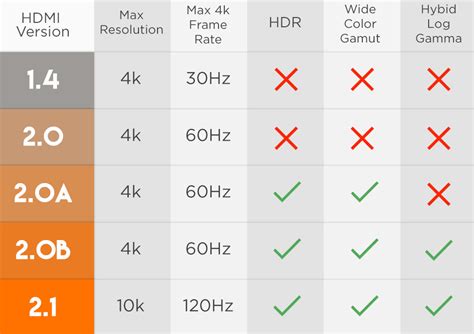
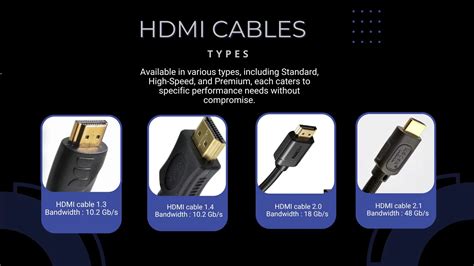
Three HDMI versions cover almost every TV sold today, and each one is defined by a specific bandwidth ceiling, not a marketing name.
| Version | Released | Max bandwidth | Max resolution and refresh |
|---|---|---|---|
| HDMI 2.0 | 2013 | 18 Gbps, per the HDMI Forum’s original release announcement | 4K at 60Hz |
| HDMI 2.1 | 2017 | 48 Gbps, per the HDMI Forum | 4K at 120Hz, 8K at 60Hz, up to 10K for specialty use |
| HDMI 2.2 | 2025 | 96 Gbps, per the HDMI Forum’s finalized specification | 16K at 60Hz, 12K at 120Hz |
A TV’s overall HDMI 2.1 badge does not guarantee that every port on it reaches 48 Gbps. TCL’s 2025 lineup, built on the MediaTek Pentonic 700 chip, shipped with only two true HDMI 2.1 ports even on TVs advertised with four HDMI inputs total, and the 2026 lineup only reached four full-bandwidth ports after TCL moved to the Pentonic 800 chip.
Is HDMI 2.2 worth waiting for?
Can I use an HDMI ARC and eARC port interchangeably? The connection will work, but it negotiates down to ARC’s lower bandwidth and drops support for lossless Dolby Atmos, DTS:X, and Dolby TrueHD, with no error message to tell you it happened.
Signs you plugged into the wrong port
Most wrong-port problems show up as a silent downgrade rather than an outright failure, which is exactly what makes them easy to miss.
| What you see or hear | Likely cause | What to check |
|---|---|---|
| Soundbar produces no sound at all | Cable is in a standard HDMI input instead of the ARC or eARC labeled port | Move the cable to the labeled port and enable the TV’s CEC setting (Anynet+, SIMPLINK, or T-Link) |
| PS5 or Xbox Series X capped at 60Hz instead of 120Hz | Console is connected to a 2.0-rated port on a TV that only has two true 2.1 ports | Move to the port explicitly rated for 4K at 120Hz on that model’s spec sheet |
| Soundbar plays Dolby Atmos but sounds compressed | Connection is running over ARC, or over eARC with an uncertified cable | Confirm the port is eARC and the cable is a certified Ultra High Speed HDMI cable |
| TV lists HDMI 2.1 but 4K at 120Hz still will not engage | The specific port in use is one of the TV’s non-2.1 inputs despite the TV’s overall badge | Check the per-port rating printed in the manual before assuming a fault |
Three of these four symptoms trace back to the same root cause: a device plugged into a technically working but bandwidth-mismatched port, which is why matching the device to the specific port rating solves more problems than replacing cables or resetting the TV.
Why is my PS5 or Xbox Series X stuck at 60Hz instead of 120Hz? On most current TVs only two of the four HDMI ports are true HDMI 2.1, so the console needs to sit in one of those two specific ports, confirmed against the model’s own spec sheet by number.
eARC needs the right cable, not just the right port
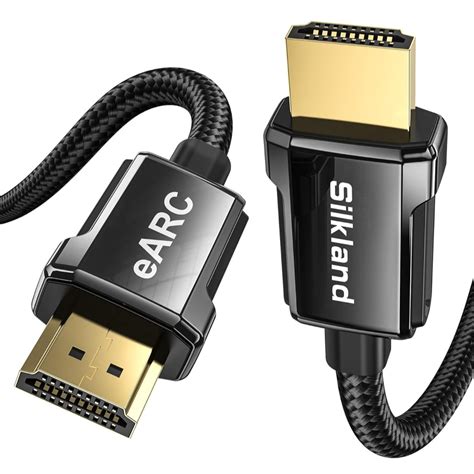
eARC’s entire advantage over ARC comes down to bandwidth: roughly 37 Mbps against ARC’s 1 Mbps, enough to carry lossless Dolby Atmos, DTS:X, and Dolby TrueHD instead of their compressed equivalents. That bandwidth only exists over a certified Ultra High Speed HDMI cable. An older High Speed cable plugged into an eARC port does not throw an error; it simply negotiates down to ARC’s audio quality, and most people never trace the drop in sound back to the cable sitting behind the TV.
Do I need a special cable for HDMI 2.1 or eARC? Only if you want the features those standards add. A certified Ultra High Speed cable is required for eARC’s lossless audio and for 4K at 120Hz gaming; older devices and basic audio get no benefit from it.
How labeling and bandwidth differ by brand and model
The number of full-bandwidth HDMI ports on a TV depends on its chipset generation as much as its brand, and that number changes from one model year to the next even within the same product line.
| TV | HDMI 2.1 ports | Typical eARC port |
|---|---|---|
| LG C5 OLED (2025) | 4 of 4, per Tom’s Guide’s testing | HDMI 1 or 2, per LG’s own connection guide, which states the port varies by model |
| Hisense U75QG (2025) | 4 of 4, per Tom’s Guide | Labeled on the port panel; varies by model |
| Hisense U8QG (2025 flagship) | 3 of 4, one port swapped for USB-C, per Tom’s Guide | Labeled on the port panel |
| TCL C8K (2025, Pentonic 700 chip) | 2 of 4, per TechRadar’s lab review | Labeled explicitly, per TCL’s own support documentation, with the exact port varying across the lineup |
| Samsung (general pattern) | Varies by series | Usually the third HDMI port, per Samsung’s own support documentation |
No manufacturer in this comparison keeps its HDMI 2.1 port count fixed across model years or tiers, so a generic assumption like “LG always has four” is a starting guess at best, worth confirming against the specific model’s own spec sheet before buying or wiring anything.
Common mistakes
- Treating an HDMI 2.1 badge as covering every port: TCL’s own 2025 to 2026 chipset change shows the port count behind that badge can double year over year on the same brand.
- Assuming ARC and eARC are interchangeable for lossless audio: the fallback happens silently, with no on-screen warning that anything downgraded.
- Buying a premium cable for a device that doesn’t need it: a cable box or older console gains nothing from a 48 Gbps certified cable.
- Skipping the manual when a port is unlabeled: some budget sets carry no printed markings at all, and the manual is the only remaining source of truth.
Does an HDMI switch or splitter add missing features to an older TV? No. A switch or splitter passes through whatever the TV’s own ports already support; it cannot add eARC, HDCP 2.2, or a higher bandwidth ceiling that the TV’s hardware lacks.
If your TV has no ARC or eARC port at all
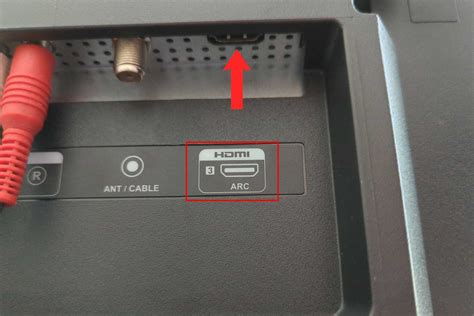
Older and budget TVs sometimes skip ARC and eARC entirely. In that case, the TV’s optical digital audio output to a soundbar or receiver is the closest working substitute for surround sound without an HDMI audio return path. No switch, splitter, or extender can add eARC’s bandwidth to a TV whose own hardware never included it.