Is your laptop actually a candidate for one?
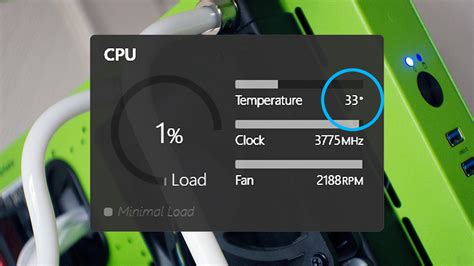
Before spending money, the more useful question is whether your laptop is running hot enough for a pad to matter. Intel publishes a Tjunction max, the temperature at which its mobile processors begin reducing clock speed to protect themselves, generally between 100°C and 110°C depending on the chip (Intel). AMD’s newer Ryzen HX mobile chips are designed to run at up to about 95°C under sustained load as a normal operating point, according to a hardware-monitoring blog citing AMD’s published specifications (GGFix); this figure is worth confirming directly against AMD’s own product page in a future update. That gap is worth naming once: reaching the manufacturer’s throttling ceiling doesn’t damage the chip, but cooling engineers still recommend keeping sustained temperatures 15°C to 20°C below it, because that headroom is what keeps clock speeds from dropping in the first place.
| Chip family | Published throttle threshold | What it means in practice |
|---|---|---|
| Intel Core Ultra H-series (mobile) | About 100°C to 105°C Tjunction max | Sustained readings here mean clock speed is already being cut |
| AMD Ryzen HX-series (mobile) | About 95°C design target | A normal operating point under heavy load, not a warning sign by itself |
| Either platform, general safe range | 65°C to 85°C under sustained load | Below this range, extra cooling makes little practical difference |
The gap between these numbers is where a cooling pad earns its keep: it doesn’t move the ceiling, but it can keep sustained load inside the 65°C to 85°C band instead of pushing against 95°C to 105°C.
To check where you stand, run a free monitoring tool during 15 to 20 minutes of the workload you actually care about, a game, a video export, a compile, and watch two numbers: whether temperatures approach the chip’s published ceiling, and whether clock speed drops while they do. If both happen together, a pad has something real to fix. If your laptop sits at 65°C to 80°C during the same workload, extra cooling will make little practical difference no matter how many fans it has.
Do I need to clean my laptop before buying a cooling pad? Often, yes, and it’s cheaper. Removing dust from intake and exhaust vents with compressed air can drop sustained temperatures 5°C to 10°C on its own (laptestpro).
Why reported cooling numbers vary so much

Search around and the range runs from a few degrees to over 20°C, and the spread isn’t inconsistency, it’s different laptops and different pads tested under different conditions.
| Source | Laptop tested | Pad tested | Result |
|---|---|---|---|
| TechRadar | Acer Predator Helios, 15-minute 3DMark stress test | Llano RGB Cooling Pad, 2,800rpm max fan | Temperature rise cut from 31.9°C unaided to 8°C |
| TechRadar | Same Acer Predator Helios | Liangstar budget pad, $19.99, 59dB at max | Temperature rise cut to 15.3°C |
| FinalBoss.io | Razer Blade 16, 2023 to 2025 generations | Razer Laptop Cooling Pad, sealed foam, Hyperboost sync | About 10°C CPU drop, about 10% performance increase over bare desk |
| FinalBoss.io | MSI Cyborg 15, budget gaming laptop | Same Razer Laptop Cooling Pad | About 20°C CPU drop, more modest performance change |
The size of each drop tracks how much thermal headroom the chassis sacrificed for thinness or price in the first place: a lighter, cheaper cooling system like the Cyborg 15’s has more room to improve than the already well-cooled Blade 16.
These are snapshots of specific, named single-outlet tests run in 2025 and 2026, not a scientific consensus across every laptop and pad on the market. As laptop chip power budgets keep rising, expect the numbers on any given model to shift, sometimes higher, sometimes lower, than what’s shown here.
Where your laptop’s vents actually are
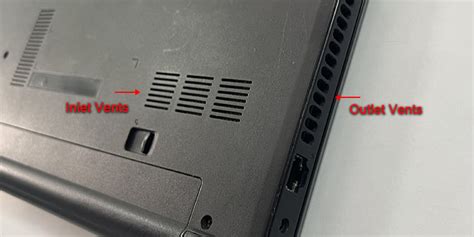
A pad can only move air where the laptop is actually built to receive it, and that location varies more than most buyers expect.
| Laptop or chassis type | Where it actually draws air in | Best-fit pad type |
|---|---|---|
| MacBook Pro or Air, M-series, 2021 onward | Side vents plus a central hinge vent, no bottom intake at all | Barely helps; a flat fan-blowing mat has nothing to blow into (SVALT, a cooling-hardware maker documenting Apple’s vent layout; worth cross-checking against Apple’s own support materials) |
| Razer Blade 16, 2023 to 2025 | Bottom-mounted intake | Sealed, foam-gasketed pad, ideally one that syncs with the laptop’s own fan curve (FinalBoss.io) |
| Budget gaming laptops like the MSI Cyborg 15 | Bottom-mounted intake, simpler internal cooling | Any decent sealed or open-mesh pad, since there’s more headroom to gain (FinalBoss.io) |
| Laptops used mainly on a lap or couch | Bottom intake, but comfort matters as much as raw cooling | A neoprene lap mat built for heat isolation, such as Targus’s Chill Mat line (Targus) |
Buying a sealed cooling pad for a fanless MacBook Air spends money that would do more good on a $20 stand that simply tilts the machine for better passive airflow.
Will a cooling pad help my MacBook Air? Barely. The M-series Air draws air through side and hinge vents instead of the bottom panel, so a standard fan-blowing pad has little to work with.
What a cooling pad will and won’t fix
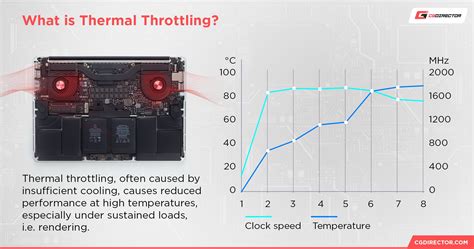
Lower temperatures and higher frame rates aren’t the same reward, and buyers chasing the second one from a cooling pad are usually disappointed. A pad delays and reduces thermal throttling, which shows up as steadier clock speeds and quieter fans over a long session; it doesn’t add graphics horsepower the chip didn’t already have. The Blade 16 test above found roughly 10% higher sustained performance largely because the stock cooling was already close to its ceiling; a laptop with headroom to spare will see almost no frame rate change no matter which pad sits underneath it.
Before buying anything, it’s worth ruling out the cheaper fixes. A can of compressed air on the intake and exhaust vents can recover 5°C to 10°C on its own, and laptops older than two to three years often run hotter simply because factory thermal paste has dried out, a separate problem no cooling pad addresses.
Will a cooling pad make my games run faster? Only if your laptop is currently throttling. About 10% higher sustained performance showed up on a Blade 16 running near its thermal ceiling, but under 2% is typical on laptops with headroom to spare, since a pad lowers temperature, not raw processing capacity.
The myth about hardware damage
No independent testing organization has published evidence that a properly sized cooling pad damages a laptop. USB-powered fans draw well under 1 watt, far inside any port’s rated capacity, and the realistic failure mode is the pad’s own fan wearing out after a few years of dust. The one real placement risk: a pad whose frame or clips sit under the laptop’s own exhaust vent traps the exact heat the internal fan is trying to expel.
Can a cooling pad damage my laptop? Not from normal operation. The realistic precaution is keeping the pad clear of the laptop’s own exhaust vent.
Passive, active, or sealed
Three basic types cover nearly everything on the market, and the choice matters less than the vent alignment covered above:
- Passive stands tilt the laptop for better convection with no fans and no noise, doing the most good on already-cool ultraportables.
- Open-fan pads blow ambient air across the underside, delivering roughly the 15°C range a budget pad achieved in TechRadar’s test.
- Sealed or vacuum pads use a foam or rubber gasket to force air specifically into the intake, the design behind the larger drops in both the TechRadar and FinalBoss tests above.
If you’re buying one
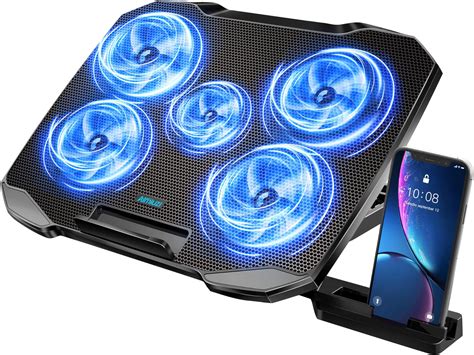
Price tracks build quality loosely. TechRadar’s $19.99 Liangstar pad cut heating by roughly half compared to no pad at all, while its premium sealed pad delivered a bigger cut, driven by the sealed design and higher static-pressure fans. What’s worth paying for: a gasket or seal that matches your laptop’s chassis, fan placement that lines up with where your laptop actually draws air, and, for lap use, a soft-bottomed mat instead of a rigid metal stand.
Is a more expensive cooling pad always better? No. Price tracks the presence of a sealing gasket and stronger fans more than it tracks brand name; a well-sealed $35 to $50 pad matched to your laptop’s vent location will usually outperform a $100 pad that isn’t.