Which Galaxy Tab models actually take an S Pen
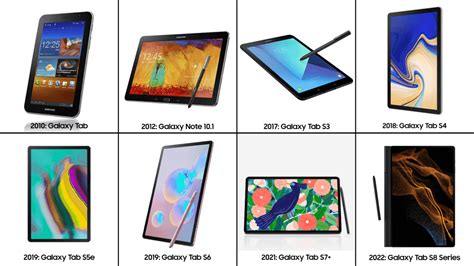
Samsung’s tablet lineup splits into two families with different pen support: the Galaxy Tab S series, listed in Samsung’s S Pen compatibility documentation as running from the Tab S6 through the Tab S11, plus every FE and Lite variant, uses a digitizer under the display that lets an S Pen register pressure, tilt, and hover without a battery. The Galaxy Tab A series has no such digitizer. A capacitive stylus draws on an A-series screen the way a finger does, without pressure levels, and it isn’t an S Pen in any functional sense.
This matters because retail listings regularly mix A-series and S-series tablets under “stylus” categories, and A-series box art sometimes shows a stylus without clarifying the difference. If S Pen note-taking, sketching, or PDF markup is the reason for buying, the Galaxy Tab A line isn’t a fallback.
Does every Samsung tablet come with an S Pen?No. Only Galaxy Tab S-series models, including every FE and Lite variant, ship with or support an S Pen. Galaxy Tab A-series tablets lack the digitizer layer entirely.
How the bundled S Pen differs across the current lineup
The word “S Pen” covers several distinct hardware variants, and the differences are concrete enough to change which tablet is worth buying.
| Tablet | Pen pressure levels | Bluetooth / Air actions / pen charging | Tip and replacement |
|---|---|---|---|
| Galaxy Tab S11 / Tab S11 Ultra | 4,096, independently confirmed | Not supported | Cone-shaped tip, incompatible with older S Pen tips; replacement $64.99 direct from Samsung |
| Galaxy Tab S10 FE / Tab S10 FE+ | Not published by Samsung | Not supported | Auto-retractable tip shared across recent tablet S-Pens |
| Galaxy Tab S10 Lite | Not published by Samsung | Not supported | Standard replaceable tip |
| Galaxy Tab S9 FE / Tab S9 FE+ | Not published by Samsung | Not supported | Standard replaceable tip |
None of these four bundled pens pair over Bluetooth or use the remote Air actions gestures, such as media control, camera shutter, or app launch, that certain Samsung phone S-Pens support. Samsung’s documentation places those features on the Galaxy S Ultra phones and the S Pen Pro accessory; the current tablet-bundled pens carry none of them.
Can I use my old S Pen on a new Galaxy Tab?Not for the S11 series. Samsung states the Tab S11 and Tab S11 Ultra’s pen tip isn’t compatible with previously released S Pen models, so a pen carried over from a Tab S9 or S10 won’t work on an S11.
Matching the S Pen to your use case
The right model depends less on budget alone than on whether screen technology, chip performance, or update longevity matters most for how the pen gets used day to day.
| Primary use case | Recommended model | Why | Starting price |
|---|---|---|---|
| First S Pen tablet, budget-conscious | Galaxy Tab S10 Lite | Same bundled S Pen experience as the flagship tier, 90Hz LCD, up to 7 years of OS upgrades | $349 |
| Heavy daily note-taking and PDF markup, no laptop replacement needed | Galaxy Tab S10 FE / S10 FE+ | Mid-tier AMOLED, same pen limitations as every other current model, lower cost than the flagship | Not independently verified in this research; check current Samsung.com listing |
| Laptop-replacement work, DeX multitasking, longest support window | Galaxy Tab S11 / Tab S11 Ultra | 4,096-level pen, 120Hz AMOLED, 7-year OS and security commitment | $799.99 for the S11; Ultra pricing varies by configuration |
The Galaxy Tab S10 Lite launched on September 4, 2025 at $349, and by April 2026 retailers were discounting the same 256GB configuration to around $300.
Does the S Pen need Bluetooth or charging to work?No. Every current Galaxy Tab S-Pen writes and registers pressure using passive EMR technology powered by the tablet’s digitizer, with no battery and no charging required. Bluetooth only unlocks extra remote gestures, which none of the current tablet pens support anyway.
Current lineup versus previous-generation Galaxy Tabs

Update policy changed with the Tab S10 generation, and that shift is the biggest practical difference between a new purchase and a discounted previous-generation model.
| Generation | Update policy | Still sold new by Samsung |
|---|---|---|
| Galaxy Tab S8 series (2022) | 4 years of Android OS upgrades | No |
| Galaxy Tab S9 / S9 FE / S9 FE+ (2023 to 2024) | 4 years of Android OS upgrades | Limited availability |
| Galaxy Tab S10 / S10+ / S10 Ultra (2024 to 2025) | 7 years of Android OS and security updates | Yes |
| Galaxy Tab S10 FE / S10 FE+ (2025) | Samsung states 7 years but hasn’t clarified to press whether both OS and security updates run the full term | Yes |
| Galaxy Tab S11 / S11 Ultra (2025 to 2026) | 7 years of Android OS and security updates, confirmed | Yes |
The practical break happens at the Tab S10 generation: anything from the S9 series or earlier tops out at four years of OS upgrades, while the S10 and S11 generations carry the newer seven-year commitment, so a discounted Tab S9 FE is trading three years of update life for a lower price, not just older specs.
Is a previous-generation Galaxy Tab still worth buying?It depends on which generation. A discounted Tab S10 or Tab S10+ keeps the full 7-year commitment, so the savings carry little downside. A discounted Tab S9 or Tab S9 FE is on the older 4-year policy, so check how many years of updates remain before treating the lower price as a clear win.
Tip wear, replacement pens, and what’s not covered by warranty
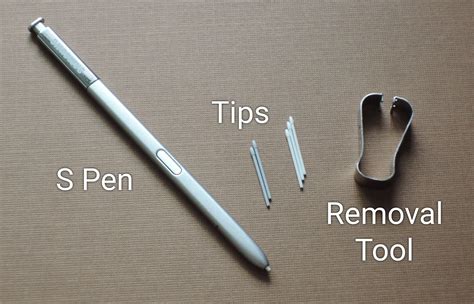
An S Pen tip is a wear part. Samsung’s support documentation walks through pulling the worn tip out and pressing a new one in until it seats, the same procedure across recent Tab S-Pen generations. Replacement tips are sold in multi-packs through Samsung and third-party retailers.
Losing the pen is a bigger cost than most buyers expect. The S Pen isn’t covered under Samsung’s device warranty, so a lost or broken pen is an out-of-pocket replacement. For the Tab S11 and Tab S11 Ultra, Samsung sells the replacement pen directly for $64.99.
What happens if the S Pen tip wears out or I lose the pen?A worn tip is a fast fix with a replacement tip kit. A lost or broken pen costs $64.99 direct from Samsung for the S11 series, out of pocket, since the pen isn’t covered by the tablet’s warranty.
Samsung DeX and the S Pen
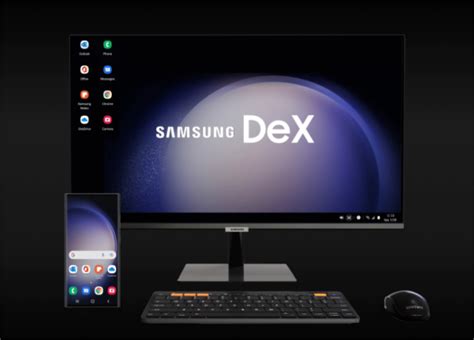
Samsung documents DeX as a full desktop-style multitasking mode with external monitor support, but doesn’t publish how S Pen input behaves once DeX is active beyond confirming the pen still functions, so anyone buying mainly for pen annotation inside DeX should test that workflow in person first.
How this comparison was built

This guide draws on Samsung’s product and support pages, independent hands-on reviews from outlets that publish their testing methodology, and update-policy reporting Samsung confirmed on the record. Competitor buying guides were used only to identify gaps in existing coverage, never as a source for any fact stated here.