Kodi, Plex, or Jellyfin: the choice that decides everything else

Before picking a distro, decide what is actually going to play the media. Kodi is a local-first application: it runs on the box connected to the TV and reads files directly, with no server-client split involved. Plex and Jellyfin are server-client systems instead: a server indexes the library and streams to apps on other devices, which matters once more than one household or more than one screen needs access.
| Kodi | Plex | Jellyfin | |
|---|---|---|---|
| Model | Local-first, no server | Client-server, cloud-authenticated | Client-server, self-hosted, no cloud account |
| Live TV & DVR | Via Tvheadend or addons, free | Requires Plex Pass | Free, built in |
| Remote streaming | N/A, local device only | Requires Plex Pass or Remote Watch Pass | Free |
| Cost for full features | Free | $749.99 one-time from July 1, 2026, or $6.99/mo, $69.99/yr | $0 |
| Addon/legal exposure | Third-party addon repos widely tied to unlicensed IPTV | Official content only | Official plugins only |
The table settles a decision most guides skip: if the household needs more than one screen or remote access, Kodi’s local-only model is the wrong starting point no matter which distro runs it, and the real choice becomes Plex versus Jellyfin.
Do I need Plex Pass just to watch my own files at home?
No. Local, at-home streaming on Plex has always been free. The Plex Pass and Remote Watch Pass gate remote streaming, hardware transcoding, and DVR; local playback on your own network stays free.
Matching the distro to your hardware
Naming a “best” distro without naming the hardware it runs on is how a list ends up recommending the same three names for incompatible situations.
| Distro | Built for | Cannot run on | Minimum RAM / storage |
|---|---|---|---|
| LibreELEC | x86 Intel/AMD, Raspberry Pi 4 and 5, Amlogic, Allwinner, Rockchip | Practically unusable under 1GB RAM; Nvidia GPUs officially discouraged | 1GB RAM / 8GB storage |
| OSMC | Raspberry Pi except 5, Vero, Apple TV (1st gen) | Raspberry Pi 5, not yet supported | Runs from Pi Model 2 up |
| CoreELEC | Amlogic S905X3 and newer (CoreELEC 22) | Amlogic S905X (GXL) and older, as of CoreELEC 22 | Device-dependent, tied to the Amlogic SoC |
| General distro + Kodi/Plex/Jellyfin | Any x86 hardware, multi-purpose boxes | No specific block, but no appliance-level simplicity | Typically 2GB or more |
The practical read: an appliance OS buys simplicity by narrowing what the box can do, and that narrowing changes with each hardware model, so it needs checking every time.
Does a Raspberry Pi 5 need more than 1GB of RAM for Kodi?
No, 1GB is still the working floor LibreELEC cites for a good Kodi experience, even on Pi 5, though every Pi 5 board ships with at least 2GB or 4GB, so this rarely comes up in practice on that board.
The maintained appliance options
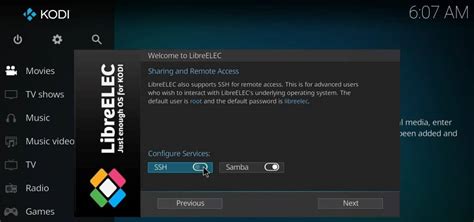
LibreELEC
The current stable release is LibreELEC 12.2.1, running Kodi Omega 21.3, with updates through November 2025. LibreELEC forked from OpenELEC in March 2016. It supports x86 generic hardware, Raspberry Pi 4 and 5, and several ARM SoC families. Its own release notes advise against buying Nvidia GPUs for use with it, since the legacy Nvidia driver no longer compiles against current Xorg and no replacement is planned for LibreELEC’s main use case.
OSMC
Built on Debian, OSMC trades LibreELEC’s minimalism for a fuller Linux underneath, which makes it easier to add non-media software later. The tradeoff is currency: OSMC’s own supported-devices page still lists Raspberry Pi 5 support as planned, with no firm date attached.
CoreELEC
CoreELEC targets Amlogic-based Android TV boxes, a narrower hardware focus than Raspberry Pi or generic PCs. It stays actively developed: CoreELEC’s official release history shows 21.3-Omega as the current stable line, with 22 in active alpha development. The cost of that forward motion is that CoreELEC 22 drops support for the S905X (GXL) chip generation, so a box built around that older chip has to stay on CoreELEC 21.
What happened to OpenELEC
OpenELEC is discontinued. It is the project LibreELEC forked from in 2016 after a split among its developers, and no further OpenELEC releases followed. Anything still pointing a fresh install at OpenELEC is pointing at a dead end.
What replaced OpenELEC?
Nothing replaced it directly. Its most active developers forked the project into LibreELEC in 2016, and that fork is the maintained successor; OpenELEC itself received no further updates afterward.
When a general-purpose distro is the better call
Skip the appliance route when the box is doing more than one job, say a machine that also shares a folder as a NAS for the rest of the house, or runs a couple of game servers between movie nights. Install Ubuntu, Fedora, or a similar distro, and add Kodi, Plex, or Jellyfin as one application among several. The instant-boot simplicity of an appliance OS goes away, but so does the restriction to a single purpose.
Hardware transcoding: the generation thresholds that matter
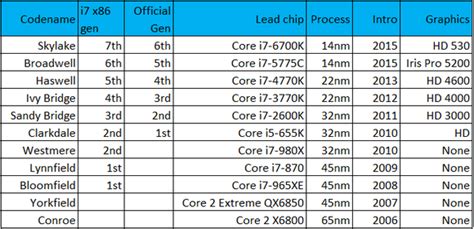
“Lightweight” and “handles 4K fine” are the two most repeated, least specific claims in this space. The real limit comes from the CPU’s media engine sitting underneath whichever distro runs on top of it.
| Codec / task | Minimum Intel generation | Example chip |
|---|---|---|
| H.264 decode/encode | Any Quick Sync-capable chip | 2nd-gen Core and newer |
| HEVC 10-bit decode/encode | Gen 9.5, 7th-gen Core (Kaby Lake / Apollo Lake / Gemini Lake) | Pentium Silver N5030, Core i3-7100 |
| AV1 decode | Gen 12, 11th-gen Core (Tiger Lake) and newer | Intel N100 (Alder Lake-N) |
| AV1 encode | Gen 12.5 (Arc A-series) or Gen 12.7 (Meteor Lake) and newer | Intel Arc A380 |
Source for generation thresholds: Jellyfin’s hardware-acceleration documentation.
The table settles the actual bottleneck: a CPU older than 7th-generation Intel cannot hardware-decode 10-bit HEVC at all, and 10-bit HEVC is the format most 4K HDR rips use, regardless of how much RAM the box has or which distro it runs.
Common mistakes and legal considerations

Buying an Nvidia GPU for a LibreELEC box is the most avoidable mistake here: the project’s own maintainers advise against it, since driver support for playback keeps shrinking. Pairing CoreELEC 22 with an older Amlogic S905X box is the second: the box still boots, but loses hardware decode paths that chip needs, so CoreELEC 21 stays the correct choice until the hardware itself is replaced.
On the addon side, Kodi’s core software is legal, maintained by the nonprofit XBMC Foundation. The third-party addon repositories most often searched alongside it are a separate matter, and they are widely associated with unlicensed IPTV and streaming sources. Installing Kodi itself carries no legal exposure. Installing unofficial third-party addon repos on top of it can.
Is Kodi legal to use?
Yes. Kodi itself is legal, open-source software maintained by the XBMC Foundation. Legal risk comes from specific third-party addon repositories that stream copyrighted content without authorization; Kodi itself carries none of that risk.