Start Here: GPU Vendor Decides More Than Distro Popularity Does
GPU vendor is the variable that changes which distro works without a fight, more than desktop polish, community size, or package manager taste.
| GPU vendor | Distro / family | Official support status | Note |
|---|---|---|---|
| NVIDIA | Ubuntu | Officially supported | Native apt packages, per NVIDIA’s CUDA Installation Guide |
| NVIDIA | RHEL / AlmaLinux / Rocky Linux / Oracle Linux | Officially supported | dnf/yum-based install path |
| NVIDIA | Debian | Officially supported | |
| NVIDIA | Fedora | Officially supported | The only vendor here whose docs name Fedora directly |
| NVIDIA | SUSE (SLES) | Officially supported | zypper-based install path |
| AMD | Ubuntu | Officially supported | Per AMD’s ROCm documentation, no OS update required first |
| AMD | RHEL | Officially supported | Registration required before install |
| AMD | SLES | Officially supported | Registration required before install |
| AMD | Debian | Officially supported | Debian 13 support currently limited to specific Instinct GPU models, per ROCm system requirements |
| AMD | Rocky Linux / Oracle Linux | Officially supported | |
| AMD | Fedora / Arch Linux | Not on the official supported-OS list | Community and AUR packages exist but aren’t a documented AMD target |
NVIDIA’s installation guide lists Fedora as an officially supported CUDA target; AMD’s ROCm compatibility matrix does not list Fedora or Arch among its supported operating systems at all. Pair an AMD GPU with Fedora or Arch and you are running on community packaging, not a documented AMD target, and driver troubleshooting threads will be thinner than for Ubuntu or RHEL.
Do I need a GPU-specific distro at all?No distro is built exclusively around one GPU vendor. What differs is which distros each vendor’s official driver stack documents as supported. Match GPU vendor to that list first, then pick among the supported options by stability preference.
The Core Options, Matched to What Each One Is Actually Good For

Five distros cover most real AI and ML setups, and each earns its place for a specific, checkable reason.
- Ubuntu 24.04 LTS. On both the CUDA and ROCm supported lists, with standard security maintenance to April 2029 (extendable via Ubuntu Pro). That combination, not familiarity, is why it’s the default.
- Fedora (current release). CUDA-supported, not ROCm-supported. A new version ships every six months, each supported roughly 13 months, so an NVIDIA-plus-Fedora setup trades a yearly forced upgrade for newer packages.
- Debian 13 “Trixie.” Supported by both CUDA and ROCm. Full security support to August 2028, LTS to June 2030, the longest horizon here.
- Arch Linux. Rolling, no fixed end-of-life, and absent from AMD’s official ROCm list. Suits developers willing to fix a broken driver stack themselves between updates.
- Pop!_OS and similar Ubuntu derivatives. Inherit Ubuntu’s CUDA/ROCm status under a friendlier setup layer; treat as a convenience wrapper on the Ubuntu row above, not a separate compatibility category.
Is Ubuntu still the safest default choice?For NVIDIA hardware, yes: it sits on both the CUDA-supported list and a five-year LTS window. For AMD hardware, it’s also safer than Fedora or Arch, since ROCm documents it directly and doesn’t document those two.
Where the Standard Advice Breaks Down

Rolling releases trade stability for freshness, and the cost shows up mid-project, not at install time: a kernel or driver package update on Arch or Manjaro can outrun the CUDA or ROCm build already installed, breaking training jobs that ran fine the day before. That’s the real tradeoff behind “latest packages,” not a footnote to it.
Hybrid-graphics laptops add a second, distro-independent failure mode: systems that switch between an integrated GPU and a discrete NVIDIA or AMD GPU can leave the discrete card invisible to CUDA or ROCm no matter which distro is installed, because the switching layer, not the distro, decides which GPU the OS sees.
Recommending CentOS as something to install fresh in 2026 is a common mistake worth naming directly: CentOS Linux 7 reached its end of life on June 30, 2024, and there is no CentOS Linux 9.
What happens if a rolling-release update breaks my CUDA setup?Typically a package upgrade moves the kernel or driver ahead of what the installed CUDA or ROCm build expects, and GPU calls fail until the offending package is pinned back or the toolkit is rebuilt against the new kernel. Ubuntu LTS and Debian avoid this by freezing package versions for years at a time.
Distro Lifecycle at a Glance
| Distro | Release model | Current status | Support window | Best for |
|---|---|---|---|---|
| Ubuntu 24.04 LTS | Fixed, 2-year cadence | Current LTS | Standard support to April 2029 | Default stable pick, NVIDIA or AMD |
| Ubuntu 22.04 LTS | Fixed | Previous LTS | Standard support to April 2027 | Existing installs not yet migrated |
| Fedora (current) | Fixed, 6-month cadence | Rolling short-support | ~13 months per release, per Fedora lifecycle tracking | Newest CUDA-side packages, NVIDIA only |
| Debian 13 “Trixie” | Fixed, ~2-year cadence | Current stable | Full support to Aug 2028, LTS to June 2030 | Longest horizon, CUDA and ROCm both |
| CentOS Stream 10 | Rolling upstream of RHEL | Current | ~5-year lifecycle, maintained to 2030 | RHEL-track development, not a drop-in stable server OS |
| Arch Linux | Rolling | Continuous | No fixed end-of-life | Latest frameworks, NVIDIA-leaning |
| NixOS | Fixed, 2-per-year cadence | 26.05 “Yarara” current | ~7 months per release | Reproducible research environments |
Debian 13 and Ubuntu 24.04 LTS both carry multi-year windows without forced package churn, while Fedora and NixOS trade that horizon for iteration measured in months. Anyone recommending CentOS as an install target rather than CentOS Stream is describing a product line that stopped shipping updates in 2024.
If You’re Not Installing a Full Distro At All
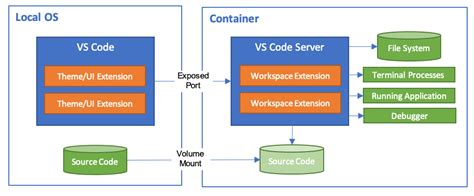
For local inference, the distro question often doesn’t need answering at all: NVIDIA’s Container Toolkit adds GPU passthrough to Docker, containerd, Podman, and Kubernetes, and works inside WSL2, so a Windows or macOS machine can run GPU-accelerated containers without a native Linux install. If your workload is running Ollama or llama.cpp against a downloaded model rather than training or fine-tuning one, this removes the distro decision from the critical path entirely.
Can I just use Docker or WSL2 instead of picking a distro?For local inference, generally yes, since the NVIDIA Container Toolkit passes GPU access into containers without a native Linux install. For training or fine-tuning at scale, a native install still tends to avoid the extra virtualization and driver-passthrough layer.
For Reproducibility-Focused Research Work
NixOS describes its entire system, packages included, in one declarative configuration file, so a research environment can be rebuilt exactly on a second machine instead of approximately. The tradeoff is a steeper learning curve than apt or dnf. Current stable is NixOS 26.05 “Yarara,” released on the project’s twice-yearly cadence.