Which “Microsoft 365 Premium” do you mean?
Two different Microsoft products share the word “Premium.” Business Premium, covered here, is a per-user business subscription built around security and device management for teams up to 300 people. Microsoft 365 Premium, launched in October 2025, is an individual consumer subscription bundling Microsoft 365 Family with Copilot Pro for $19.99 a month, with no connection to business tenant security. Everything below is about the business plan.
Is Microsoft 365 Premium the same as Microsoft 365 Business Premium?No. Microsoft 365 Premium is a $19.99 per month individual plan combining Microsoft 365 Family and Copilot Pro. Microsoft 365 Business Premium is a $22.00 per user per month business plan for up to 300 employees, centered on security and device management, not personal AI features.
What Standard already covers, and where Premium starts
Both plans include the full desktop, web, and mobile versions of Word, Excel, PowerPoint, and Outlook, plus Teams, custom-domain Exchange email, and 1 TB of OneDrive storage per user, for up to 300 users, according to Microsoft’s security pricing page for small and medium business. Standard adds Exchange Online Protection spam and malware filtering and basic password policies. Premium starts from that same base and layers on four security products plus Purview’s data governance tools.
| Feature | Standard | Premium | Priced separately at |
|---|---|---|---|
| Word, Excel, PowerPoint, Outlook, Teams, 1 TB OneDrive | Yes | Yes | — |
| Exchange Online Protection (spam/malware filtering) | Yes | Yes | — |
| Microsoft Defender for Business (device antivirus, EDR) | No | Yes | $3.00/user/month |
| Microsoft Defender for Office 365 P1 (phishing, safe links/attachments) | No | Yes | $2.00/user/month |
| Microsoft Entra ID P1 (conditional access, identity protection) | No | Yes | $6.00/user/month |
| Microsoft Intune P1 (device management) | No | Yes | $8.00/user/month |
| Microsoft Purview DLP and e-discovery | No | Yes | not sold standalone to SMB tenants |
Four of those five additions carry individual list prices, and together they total $19.00 per user per month: more than the entire $12.50 Standard subscription they’d sit on top of.
What the security layer would cost bought piece by piece
Buying Defender for Business, Defender for Office 365 P1, Entra ID P1, and Intune P1 as four separate add-ons on Business Standard costs $12.50 plus $19.00, or $31.50 per user per month, against $22.00 for Premium as one subscription. That’s a $9.50 gap in Premium’s favor before Purview’s data-loss tools are even counted, since Microsoft doesn’t sell those standalone to SMB tenants.
Microsoft announced this packaging on December 4, 2025 and set July 1, 2026 as the effective pricing date, with the underlying feature rollout completing by August 1, 2026, according to the Microsoft 365 pricing and packaging updates notice. After July 1, Standard’s price rises to $14.00 per user per month while Premium holds at $22.00, narrowing the list-price gap to $8.00, even as the standalone security-tool total stays at $19.00.
Both plans also gain 50 GB of additional mailbox storage and Copilot Chat enhancements as part of the same update.
What a ransomware incident costs a small business
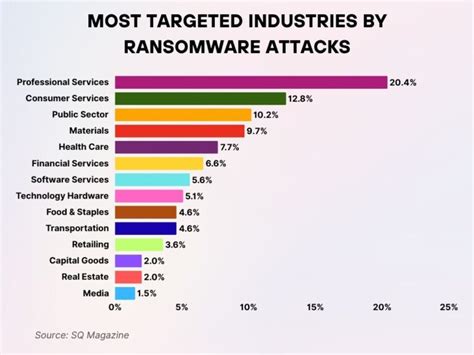
Verizon’s 2025 Data Breach Investigations Report, SMB snapshot found ransomware present in 88% of breaches at small and mid-sized businesses, against 39% at large organizations, and the full report put the median ransomware payment at $115,000, down from $150,000 the year before.
Who should be on Premium, and who can stay on Standard
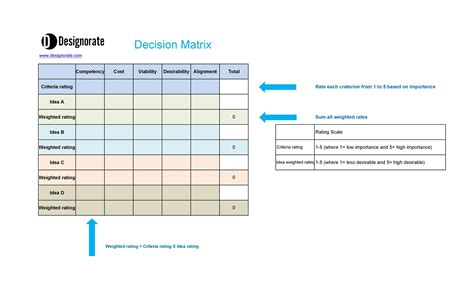
| Business situation | Recommended plan | Why |
|---|---|---|
| Office-based team, no regulated data, company-owned desktops only | Standard | Baseline spam filtering and MFA cover the realistic threat surface |
| Remote or hybrid staff using personal devices | Premium | Enforcing compliance on hardware the company doesn’t own needs more than baseline controls |
| Handles client financial, health, or legal data | Premium | Covers the two most common ransomware entry points: email and endpoint |
| Cyber insurance renewal underway | Premium | Insurers increasingly ask for MFA, EDR, and conditional access as baseline controls Standard alone doesn’t fully provide |
| Fewer than 10 users, single location, no compliance pressure | Standard | The $8.00 to $9.50 per user monthly gap can exceed the realistic risk it covers |
Company size alone decides nothing here. Device ownership and data sensitivity decide it.
What Premium does not include
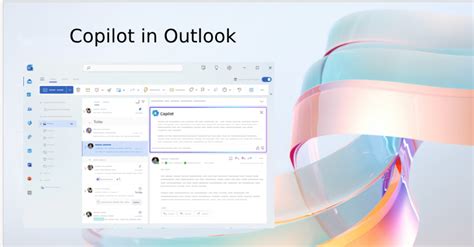
Does Microsoft 365 Business Premium include Copilot?No. Copilot is sold as a separate add-on to both Business Standard and Business Premium at the same price, so the Premium upgrade adds security and device management, not AI capability.
Mixing Standard and Premium in the same organization

Licenses are assigned per user, not per tenant, so a business can put Premium on specific employees and Standard on the rest inside one subscription; both draw from the same combined 300-seat cap that applies across the whole Basic, Standard, and Premium family in a tenant, per Microsoft’s business plans and pricing page. Intune and Defender for Business only manage the devices of users who hold a Premium license, so an unlicensed colleague’s laptop stays outside the security policy even on the same team.
Microsoft’s Intune licensing documentation states that if a device is shared by more than one user, either the device itself needs a device-based license or every user of it needs a user-based license, which matters for reception desks, warehouse terminals, or any shared workstation a business might leave unlicensed by default.
Can I assign Standard to some employees and Premium to others?Yes. Licenses are assigned per user, and a business can mix Standard and Premium within one tenant, but Intune and Defender for Business only protect the devices of users who hold a Premium license.
Switching plans: what changes operationally
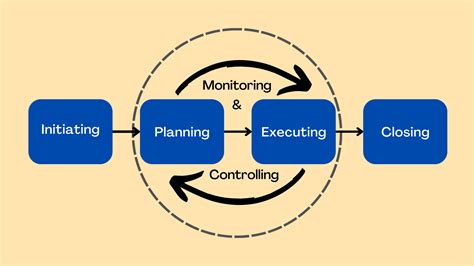
A license change from Standard to Premium takes effect on the account immediately in the Microsoft 365 admin center, while Intune enrollment and Defender for Business protection apply once the device next checks in against the new policy set. Removing a Premium license from a user with enrolled devices can affect those devices’ compliance and management status, and Microsoft’s guidance is that reassigning the license restores it.
There’s no data migration step involved: mailbox, OneDrive, and Teams content stay in place through a plan change, since the underlying Exchange, SharePoint, and Teams services don’t change between Standard and Premium.
What happens to my files and email when I change plans?Nothing moves. Exchange, OneDrive, and Teams run on the same services regardless of Standard or Premium, so switching plans changes security and device-management entitlements without touching stored data.
When 300 users isn’t enough
Both Business Standard and Business Premium cap out at 300 total users per tenant. Organizations that outgrow that move to Microsoft 365 E3, the closest enterprise equivalent to Premium, priced at $39.00 per user per month with Teams from July 1, 2026, up from $36.00. Microsoft 365 E5 adds advanced compliance and security analytics at $60.00 per user per month over the same date, up from $57.00.
E3 gains Defender for Office 365 Plan 1 and additional Intune capabilities as part of the same July 2026 packaging update that leaves Business Premium’s price untouched.